Which layer changed your canonical? A reproducible conflict diagnosis

The canonical looks correct in View Source, but a browser inspection shows another URL. Where did it change? Editing the same HTML tag again will not help if JavaScript replaces it after the response arrives.
Start with one exact input URL and compare its declarations at four layers: HTTP response, raw HTML, rendered DOM and sitemap. Keep a fifth field for Google’s indexed choice. This walkthrough produces a layer-specific diagnosis, rather than another generic list of reasons a page might not be indexed. If you need that broader sequence first, use the Google indexing troubleshooting guide.
Save one observation per layer
Write down the intended canonical and why these URLs represent the same or very similar content. A canonical is not a way to assign an unrelated landing page to every URL. Preserve the original path, query string, hostname and redirect destination while investigating.
Collect these fields together:
input_url, captured_at, final_url, response_status
http_link_canonicals[], raw_html_canonicals[], rendered_canonicals[]
sitemap_locations[], google_selected_canonical, google_last_crawl
Arrays matter: two plugins can emit two declarations. Do not let a checker that reads only the first tag hide the second. Preserve response headers and bodies as well as the extracted values. A Canonical Checker can help locate candidates; the raw observations explain which layer supplied each value.
Use an actual GET response, rather than assuming a HEAD response is identical:
curl -sS -D response-headers.txt -o response.html 'https://example.com/page/'
This command does not follow redirects. For a 3xx, save each hop’s status and Location before inspecting the final document. Follow the redirect layer walkthrough if the input changes destination. A canonical declaration does not itself redirect a visitor.
Reproduce four different conflicts
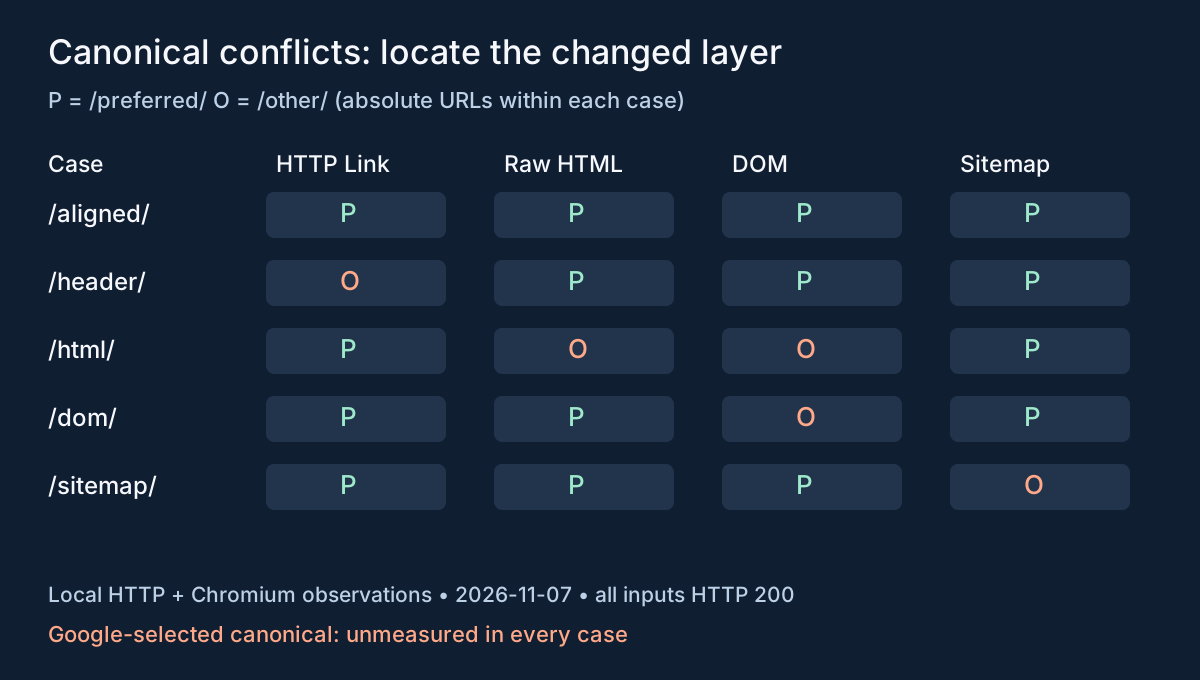
The following controlled loopback experiment ran on November 7, 2026. It is not a customer incident, a Fennec application export or a Google indexing experiment. Each case serves equivalent sample content at /preferred/ and /other/, with its own case prefix. In the table, P means that case’s absolute /preferred/ URL and O means its absolute /other/ URL.
Use the lab script, HTTP captures and browser captures. Use Node.js 18 or later and save the linked script in a fresh folder:
mkdir canonical-layer-lab
cd canonical-layer-lab
npm init -y
npm install node-html-parser@6.1.13
# Save the linked script here as lab.mjs.
node lab.mjs
node lab.mjs --serve
The capture command, node lab.mjs, starts an available loopback port, fetches five cases and their XML, saves bodies and SHA-256 hashes, then closes. Rerunning replaces any HTTP captures in that folder. Keep the linked original records separate. The --serve command keeps a browser-accessible server at http://127.0.0.1:4407; stop it with Ctrl-C. It needs Node and node-html-parser, not credentials. If port 4407 is occupied, edit the fixture port and use the new address in your browser.
Open /dom/preferred/ on that server. In DevTools, compare the document’s Network response with Elements. Read all canonical elements in the console:
[...document.querySelectorAll('head link[rel~="canonical"]')]
  .map(element => element.href)
For the other rows, append preferred/ to the listed case prefix, for example /header/preferred/. The matching sitemap is at /header/sitemap.xml. The saved browser observations were collected with Chromium; they include response bodies, header values and rendered canonical arrays. HTTP and browser captures use different local ports, so compare case names and paths, not full URL bytes across runs.
| Case prefix | HTTP Link | Raw HTML | Rendered DOM | Sitemap location |
|---|---|---|---|---|
/aligned/ | P | P | P | P |
/header/ | O | P | P | P |
/html/ | P | O | O | P |
/dom/ | P | P | O | P |
/sitemap/ | P | P | P | O |
All five input documents returned HTTP 200. In /dom/, JavaScript changes the existing tag’s href from P to O. In /html/, no script changes that value: the browser simply preserves O from the response. The same rendered value therefore has two different causes. The all-aligned case is a control, not a guarantee that Google would select P.
Trace the mismatch to its producer
For /header/, inspect the HTTP Link header producer. On a real site that could be application middleware, hosting configuration or a proxy. Compare the delivered response before assigning responsibility; the fixture itself has only one Node server and proves nothing about a particular CDN.
For /html/, inspect the server template or CMS output. For /dom/, inspect the script or client-side head manager that changes the canonical. Google’s JavaScript SEO guidance advises keeping a JavaScript-set canonical consistent with an existing HTML declaration.
For /sitemap/, inspect the URL inventory or sitemap generator with the Sitemap Checker. A sitemap does not override a conflicting HTML declaration by authority. Google’s canonical guidance describes redirects and canonical annotations as strong signals, and sitemap inclusion as weaker. This is not a numerical vote or a guaranteed order of selection. Using both HTML and HTTP canonicals creates another value to keep consistent; one correctly maintained method is generally simpler.
After correcting a producer, repeat the same requests and browser inspection. Check that intended target P returns the expected content, remains crawlable and eligible for indexing, and receives direct internal links. An aligned tag pointing at an error page is not a completed repair. For multilingual pages, apply the hreflang and canonical guide before treating translations as duplicates. Use the before-and-after evidence walkthrough to retain controls and catch a new regression.
Keep Google’s choice in a separate field
For every local case above, google_selected_canonical is null: it was not measured. No Search Console data was used, and a loopback browser cannot establish Google’s choice.
For a real URL in a property you manage, open URL Inspection’s indexed result and record the user-declared canonical, Google-selected canonical and last crawl time alongside the current captures. The URL Inspection documentation distinguishes indexed data from the live test: the live test cannot predict the canonical Google will select.
If the last crawl predates the repair, do not label the old indexed choice a fresh failure of today’s response. If the field is absent, record it as unavailable rather than assuming it equals your declaration. If Google still chooses a different URL after a later crawl, inspect the selected page’s content and remaining signals using Google’s canonical troubleshooting guidance.
The useful result is precise: “the current HTTP header disagrees with HTML,” or “JavaScript changes the response canonical.” Google accepting the preferred URL is a separate observation, with its own timestamp and evidence.