FennecSEO Chrome Extension + OpenClaw SKILL: Real-Time SEO Audits for Humans and Agents

🚀 We’ve officially launched the FennecSEO Chrome Extension and published a matching OpenClaw SKILL so that both humans and local AI agents can run the same high‑fidelity SEO audits.
If you live inside the browser or you’re building autonomous SEO workflows on top of OpenClaw, this combo is designed for you.
- 🔗 Chrome Web Store: FennecSEO Chrome Auditor
- 🤖 OpenClaw SKILL: fennecseo-audit SKILL on ClawHub
What the FennecSEO Chrome Extension Does 🦊
The extension lives in the Chrome side panel, so you can audit any page without leaving the current tab. It’s built for real‑time, page‑level audits rather than generic domain overviews.
Core capabilities
One-click comprehensive audit
- Run a full on-page + technical audit for the active tab
- Analyze meta data, headings, content structure, links, images and more in one place
Deep on-page structure
- Title / meta description length and status
- Canonical URL, language, viewport and other critical head tags
- H1–H6 structure with potential issues (missing / duplicated / over‑used)
Link & image intelligence
- Internal vs external links, nofollow usage, duplicates
- Link table with URL, anchor text, rel, target, basic status
- Image coverage: missing or empty
alt, large image hints
Robots & sitemap checks
- robots.txt availability and basic content hints
- sitemap endpoints and simple stats where available
Structured data & social tags
- Detect JSON‑LD / Microdata / RDFa
- Quick summary of schema types implemented
- Open Graph / Twitter card coverage for social sharing
Productivity features
- Side panel workflow while browsing SERPs or competitor sites
- Quick links to external tools (e.g. PageSpeed, Ahrefs entry points, etc.)
Design principle: the extension only reads what it needs for SEO analysis, runs in a local, isolated Chrome context, and does not inject ads or unrelated scripts.
Feature overview at a glance
| Area | What we check | Why it matters |
|---|---|---|
| Meta & head | Title, description, canonical, language, viewport, indexability signals | CTR, relevance and crawl/index control |
| Headings (H1–H6) | Counts, nesting, duplication, missing headings | Content structure & topical clarity |
| Links | Internal vs external, nofollow, duplicates | Crawl budget, PageRank flow, UX |
| Images | Alt attributes, basic size hints | Accessibility, image search, page weight |
| robots.txt | Availability, key rules, sitemap hints | Crawl control and discoverability |
| Sitemap | Sitemap URLs, basic stats where available | Coverage and content discovery |
| Schema / structured data | JSON‑LD / Microdata / RDFa presence, schema types summary | Rich results eligibility, AI understanding |
| Social tags | Open Graph & Twitter card coverage | Social sharing and link preview quality |
OpenClaw SKILL: Turning the Extension into an SEO Agent Tool 🤖
Alongside the extension, we’ve published a dedicated OpenClaw SKILL:
The goal is simple: give your OpenClaw agents the same audit surface that you see in the Chrome side panel.
Typical workflow
- Your OpenClaw agent receives a URL that needs a technical or on‑page review.
- The agent calls the fennecseo-audit SKILL, which in turn uses the Chrome extension to analyze the page.
- The extension runs the full audit locally (meta, headings, links, images, robots, sitemap, schema, social).
- The SKILL returns structured audit data back to the agent.
- The agent uses this data as context to plan follow‑up actions (e.g. content rewrites, ticket creation, monitoring).
You can think of the SKILL as a bridge:
- Local browser rendering power ✅
- SEO‑specific audit logic in the extension ✅
- Agent orchestration and long‑running workflows in OpenClaw ✅
Example: Monitor New Content + Auto Audit Workflow (YAML)
Below is a more complete conceptual example of how you could wire the SKILL into an OpenClaw workflow:
task: monitor_new_content_and_audit
schedule: "0 * * * *"   # Run every hour

sources:
  - type: rss
    name: main_blog
    url: "https://fennecseo.app/rss.xml"

steps:
  - name: detect_new_urls
    action: diff_feed_urls
    params:
      cache_key: "latest_audited_urls"

  - name: run_fennecseo_audit
    when: "{{ detect_new_urls.new_urls | length > 0 }}"
    action: call_skill
    params:
      skill: "fennecseo-audit"
      input:
        urls: "{{ detect_new_urls.new_urls }}"
        depth: 1
        options:
          render_js: true
          include:
            - meta
            - headings
            - links
            - images
            - robots
            - sitemap
            - schema
            - social

  - name: summarize_for_humans
    action: llm_summarize
    params:
      model: "local-llama3"
      prompt: |
        You are a senior technical SEO. Based on the audit results below,
        produce for each URL:
        1) Top 3 issues
        2) Concrete, actionable fixes
        3) Which team needs to be involved (content, dev, ops)

        Audit results:
        {{ run_fennecseo_audit.report }}

  - name: notify_slack
    action: notify
    params:
      channel: "seo-alerts"
      format: "markdown"
      message: |
        🦊 New content auto-audit completed:

        {{ summarize_for_humans.summary }}
This pattern covers a very common real‑world use case:
- Detect new content (via RSS, sitemap or custom feeds)
- Trigger browser‑level audits through the SKILL
- Use a local LLM to turn raw metrics into human‑readable recommendations
- Push a concise summary into Slack or any team channel
How to Install and Use the SKILL in OpenClaw
The SKILL is a local skill package that lives on disk and is picked up by OpenClaw from your skills directory.
You typically install it in one of two ways:
-
Install via CLI (recommended)
Make sure you have Node / Bun available, then run one of:npx clawhub install fennecseo-audit # or bunx clawhub install fennecseo-auditThis will download the SKILL package from ClawHub and place it under your local skills directory (for example
~/.openclaw/skills/fennecseo-audit). -
Install manually from ZIP
- Open the ClawHub page for the SKILL:
👉 fennecseo-audit SKILL on ClawHub - Download the ZIP archive for the SKILL.
- Unzip it into your OpenClaw skills folder, e.g.:
~/.openclaw/skills/fennecseo-audit
- Open the ClawHub page for the SKILL:
After installation:
- Restart or reload OpenClaw so it discovers the new SKILL.
- In your agent or workflow configuration, reference the SKILL by name (for example
fennecseo-audit) in thecall_skillstep, as shown in the YAML example above. - Pass URLs and options (which sections to audit, whether to render JS, etc.) through the SKILL input.
For more details on how skills are discovered and loaded, see the OpenClaw skills documentation:
👉 https://docs.openclaw.ai/tools/skills#skills
Controlling Existing Chrome Windows with the OpenClaw Browser Extension
By default, OpenClaw can launch its own browser context when running web tools.
If you want agents to reuse your existing Chrome windows instead of opening a fresh one every time, you can:
- Install the official OpenClaw browser extension in Chrome.
- Follow the guide in the OpenClaw docs to let the extension attach to your current Chrome session and expose it as a controllable target for agents.
- Configure your OpenClaw tools / workflows so that browser‑based steps (including those used by the
fennecseo-auditSKILL) run via the Chrome extension integration rather than spawning a separate headless browser.
This setup is especially useful when:
- You are already logged into multiple properties/accounts in your main browser.
- You want agents to see exactly what you see (cookies, sessions, feature flags).
- You are debugging complex sites where reproducing the same state in a separate browser is hard.
For detailed configuration options and the latest capabilities, refer to the official OpenClaw documentation for the Chrome extension:
👉 https://docs.openclaw.ai/tools/chrome-extension
Architecture snapshot (Mermaid)
flowchart LR
  U[SEO Specialist \n or Team] -->|clicks audit| E[FennecSEO Chrome Extension]
  A[OpenClaw Agent] -->|calls SKILL| S[fennecseo-audit SKILL]
  S -->|triggers audit| E
  E -->|returns metrics & issues| R[SEO Audit Report]
  R -->|used as context| A
This pattern lets you reuse the same audited signals everywhere:
- In your manual reviews (Chrome side panel)
- In your automated agents (OpenClaw workflows and cron‑style tasks)
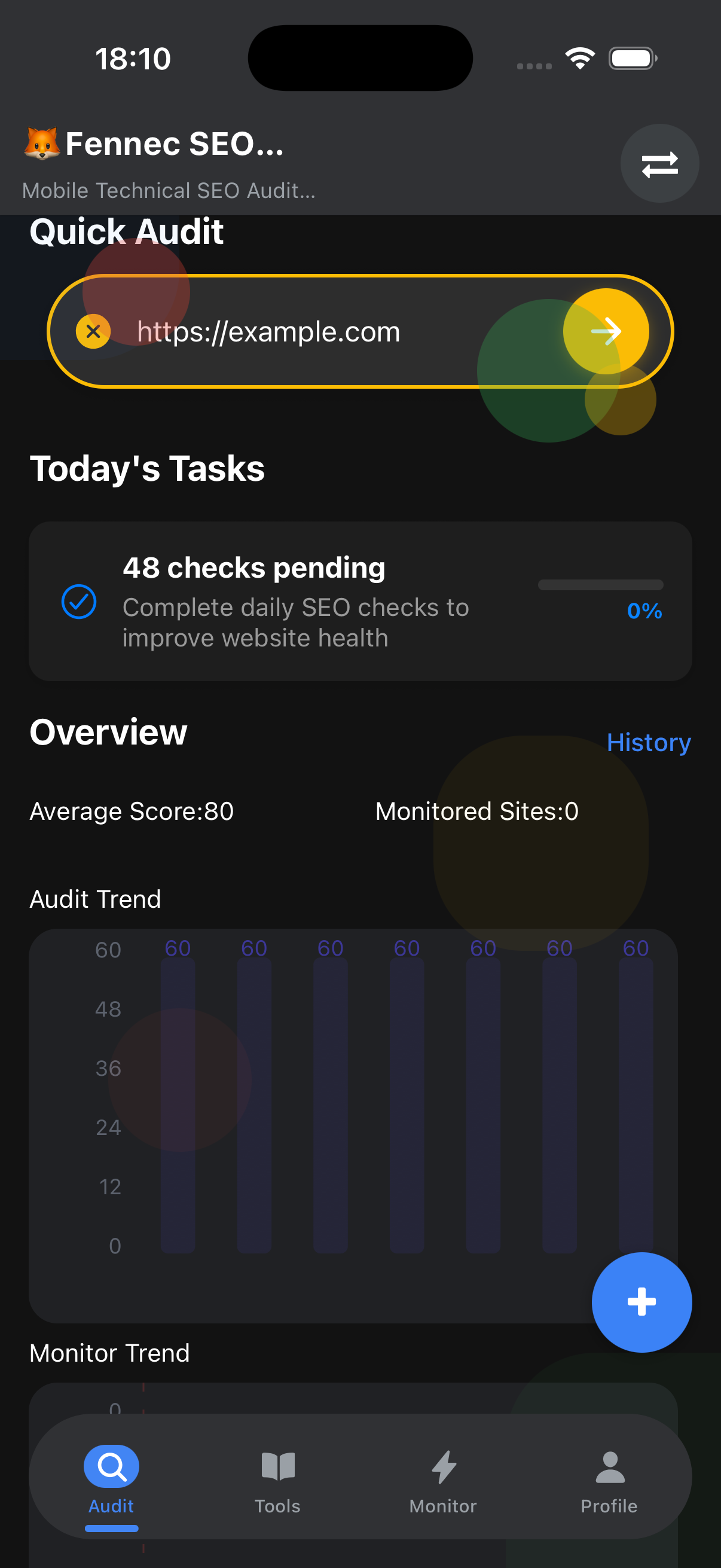
Mobile App Version: Coming Soon 📱
The browser extension is just the first step. We’re also preparing a mobile app version of FennecSEO that focuses on:
- 🔍 GSC integration – subscribe to Google Search Console events for ranking drops, coverage changes and Core Web Vitals shifts.
- 🤖 AI SEO workflows – generate fix suggestions and checklists directly on your phone, powered by local or cloud LLMs.
- 📊 On-the-go audit dashboards – triage issues across multiple sites during commutes, client visits or conferences.
The goal is to unify:
- Browser‑based audits (Chrome extension)
- Agent‑driven automation (OpenClaw SKILL)
- Mobile‑first monitoring and response (upcoming app)
If you’re already using the extension, the app will feel like a portable command center for the same SEO stack.
Who Should Care About This Stack?
This combination is particularly useful if you are:
- An SEO lead running recurring technical audits for multiple brands.
- A content or growth team that needs fast, page‑level diagnostics without leaving Chrome.
- A technical SEO or engineer experimenting with autonomous agents and local LLM workflows.
For deeper technical reading and broader SEO Study Resources, you can also explore external references like
Tech SEO resources — a helpful hub for hands‑on SEO ideas and experiments.
How to Get Started Today
- Install the Chrome extension
- Run a few audits on your key pages
- Homepage, top landing pages, and important money pages
- Add the SKILL to your OpenClaw workspace
- Wire it into your first workflow
- For example: “monitor new blog posts + audit + send summary to Slack”
As we ship the upcoming mobile app + GSC + AI SEO features, this stack will evolve into a full funnel:
Discover issues → Audit deeply → Generate fixes → Monitor impact
If you have specific workflows you’d like to automate with the extension or SKILL, feel free to reach out and we’ll iterate on the toolchain together. 🦊