Server Log Analysis for AI Crawlers: Verify Bots, Costs, and Policy

If you need to analyze AI crawler traffic, start with one rule: trust verified logs, not screenshots or user-agent guesses.
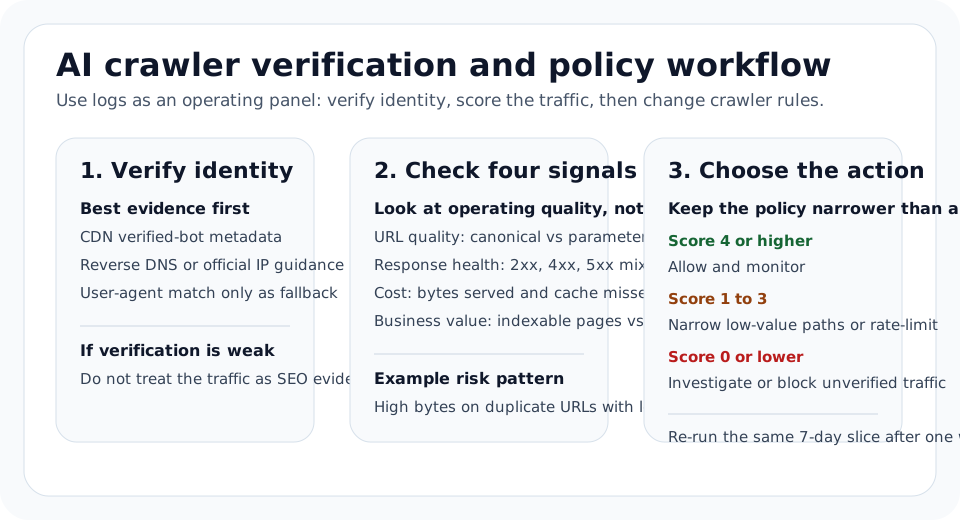
Google says the best way to confirm Googlebot is reverse DNS or Google’s published IP ranges. OpenAI documents separate crawlers for search, training, and user-triggered fetches. Cloudflare AI Crawl Control exposes requests, allowed requests, data transfer, top paths, and status-code patterns. Put those together and you can decide what to allow, narrow, rate-limit, or block with evidence instead of debate.
This guide gives you a practical workflow for analyzing AI crawler traffic without confusing verified bots, spoofed user agents, and user-triggered assistant fetches.
What Each Data Source Can And Cannot Tell You
Do not treat every dashboard as interchangeable.
| Source | Best for | What it misses |
|---|---|---|
| Raw server or edge logs | Verifying who requested which URL, when, with what status, and at what byte cost | Needs cleanup and bot verification |
| Cloudflare AI Crawl Control | Requests, allowed requests, edgeResponseBytes, status-code distribution, popular paths, crawler/operator filters, referral data on paid plans | It is a product layer, not a replacement for raw origin logs |
| Search Console Crawl Stats | Google’s crawling history on your property, including requests, download size, response time, crawl purpose, and Googlebot type | Google only, root-level properties only, and totals may differ from your own logs |
robots.txt rules | Declaring crawl policy | Rules alone do not prove whether a crawler complied or whether the traffic was worth serving |
Two limits matter immediately:
- Search Console Crawl Stats is about Google’s crawling history on your website, not OpenAI or other operators.
- Cloudflare’s robots.txt violations view compares your current directives with past requests, so recently added rules can make earlier legitimate requests look like violations.
If you only have one source, use it. If you have to make a policy decision, combine at least logs plus one verification layer.
Step 1: Pull A Clean 7- Or 30-Day Slice
Start with a controlled time window, not a full-year export.
Use one or more of these inputs:
- Web server access logs
- CDN edge logs
- Cloudflare AI Crawl Control metrics
- Load balancer logs
- Search Console Crawl Stats for Google-specific context
Keep the first pass simple:
- Filter to production hosts only.
- Remove health checks and internal monitoring traffic.
- Separate HTML page requests from static assets.
- Keep one timezone for the whole analysis.
- Split
/and/zh/or other locale directories if they should both be crawlable.
That gives you a slice you can actually compare week to week.
Step 2: Verify Identity Before You Trust The Label
This is the step most teams skip, and it is usually where the policy goes wrong.
Verify Googlebot
Google’s crawler documentation says the best way to verify Googlebot is reverse DNS or matching the source IP against Google’s published ranges. Do not treat Googlebot in a raw user-agent string as proof.
You can verify a suspected Googlebot IP from the shell:
host 66.249.66.1
dig -x 66.249.66.1 +short
If the reverse lookup resolves to a Google-owned hostname such as googlebot.com, google.com, or googleusercontent.com, verify the hostname maps back to the same IP before you trust it.
Verify OpenAI crawlers
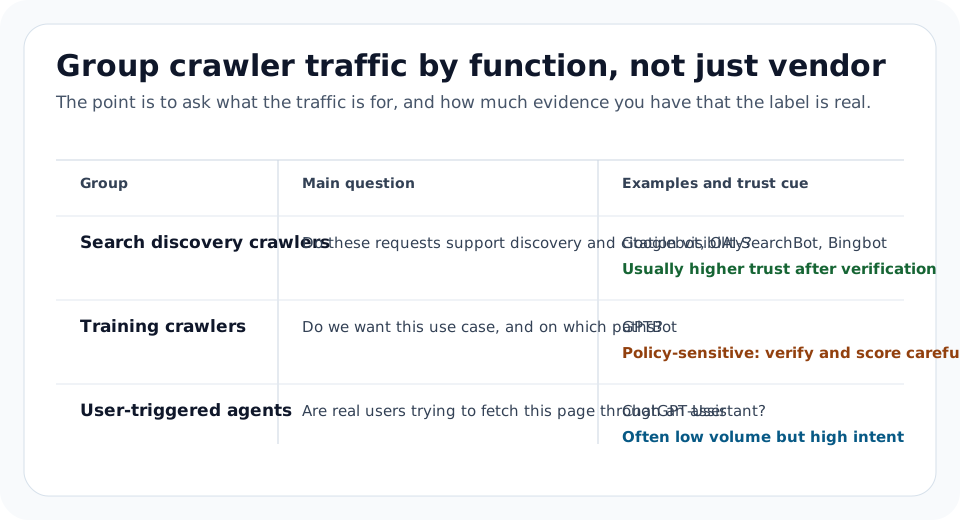
OpenAI’s crawler overview splits its traffic into different roles:
| User agent | What OpenAI says it is for | Why it matters in logs |
|---|---|---|
OAI-SearchBot | Search results in ChatGPT search features | This is the crawler that matters if you want search visibility in ChatGPT |
GPTBot | Crawling content that may be used to improve generative AI foundation models | Separate this from search decisions |
ChatGPT-User | User-triggered fetches in ChatGPT and Custom GPTs | This is not automatic web crawling, and robots.txt rules may not apply |
OpenAI also publishes IP ranges for these agents on the same documentation page. If you are making allow or block decisions, verify both the declared crawler role and the source IP range instead of matching only on user-agent.
Prefer verified bot metadata over text matching
If your CDN or edge provider exposes verified bot metadata, use that first.
Cloudflare’s AI Crawl Control GraphQL filters explicitly distinguish between:
userAgent_like, which can be spoofedbotDetectionIds_hasany, which Cloudflare documents as reliably verified
That is the right model for logs too: verified detection first, raw string matching only as fallback.
Step 3: Keep The Fields That Support A Decision
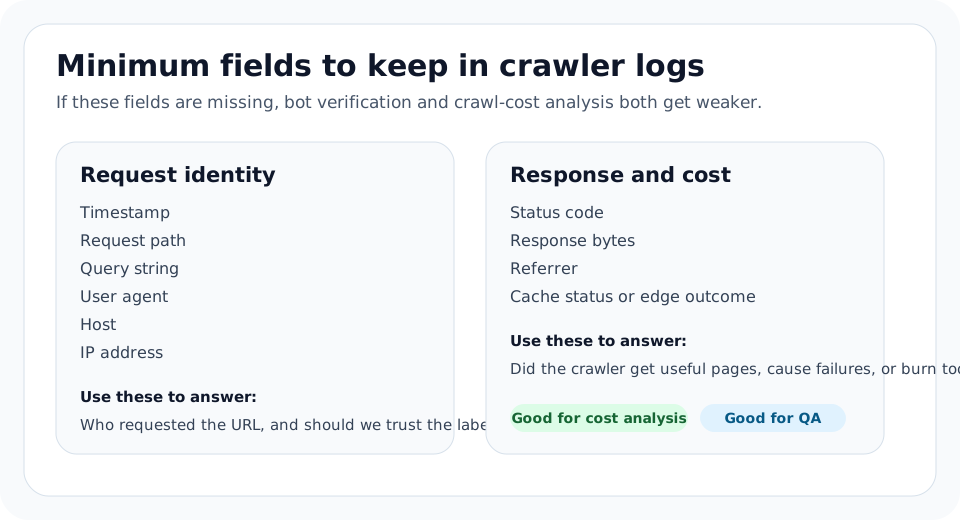
For each request, keep at least these fields:
| Field | Why it matters |
|---|---|
| Timestamp | Detect crawl bursts and compare before/after policy changes |
| Host | Separate production, staging, and language hosts |
| Request path | See whether bots hit canonical pages or junk URLs |
| Query string | Catch faceted or parameter crawl waste |
| User agent | Group crawler families |
| Verified bot or detection ID | Distinguish trusted identity from spoofed strings |
| Status code | Measure success versus errors |
| Response bytes | Quantify crawl cost |
| Referrer | Spot user-triggered visits when present |
| Cache status or edge outcome | Understand whether the CDN shielded origin load |
| IP address | Support bot verification when detection metadata is absent |
If you use Cloudflare, map your operating view to the product’s documented fields and tables:
- Analyze AI traffic surfaces total requests, allowed requests, unsuccessful requests,
edgeResponseBytes, status-code distribution, top referrers, and popular paths. - The GraphQL API exposes filters for host, path, status range, user agent, referrer host, and verified detection IDs.
Step 4: Build A Weekly Rollup You Can Reuse
If you do not have a reporting layer yet, start with one 7-day export.
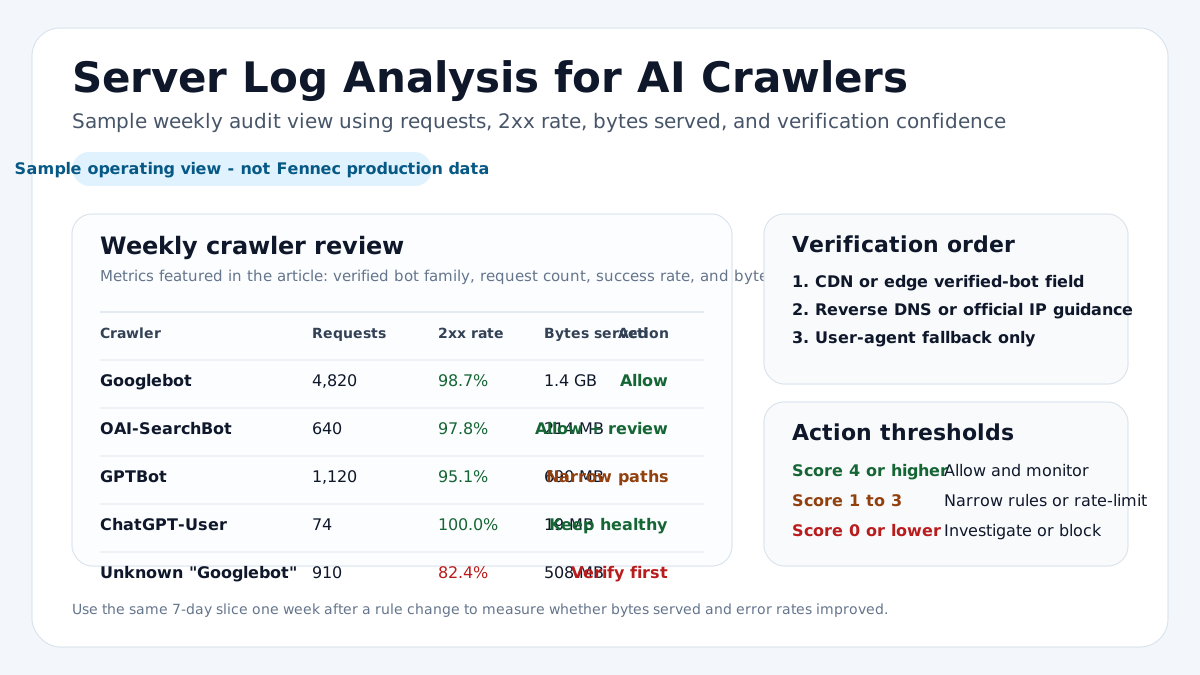
The table below is a sample operating view, not Fennec production data:
| Crawler | Requests | 2xx rate | Main path pattern | Bytes served | Likely action |
|---|---|---|---|---|---|
Googlebot | 4,820 | 98.7% | Canonical articles and docs | 1.4 GB | Allow and monitor |
OAI-SearchBot | 640 | 97.8% | Public blog and feature pages | 214 MB | Allow and review landing pages |
GPTBot | 1,120 | 95.1% | Blog plus parameter URLs | 690 MB | Narrow low-value paths |
ChatGPT-User | 74 | 100.0% | Deep links to specific guides | 19 MB | Keep public pages healthy |
Unknown Googlebot strings | 910 | 82.4% | Mixed errors and odd parameters | 508 MB | Verify before trusting |
That single table changes the conversation from “Do we like this bot?” to “What did this verified crawler actually request, and what did it cost?”
Step 5: Query Verified Traffic First
If your logs land in a warehouse, use verified identifiers whenever you can.
For Cloudflare-backed analysis, the official GraphQL examples show two approaches:
botDetectionIds_hasanyfor reliably verified crawlersuserAgent_likeonly when detection IDs are unavailable
This example follows that pattern:
{
  viewer {
    zones(filter: { zoneTag: "<ZONE_ID>" }) {
      httpRequestsAdaptiveGroups(
        filter: {
          datetime_geq: "2026-07-19T00:00:00Z"
          datetime_leq: "2026-07-26T00:00:00Z"
          requestSource: "eyeball"
          botDetectionIds_hasany: [123815556, 132995013, 126255384]
        }
        limit: 5000
      ) {
        count
        dimensions {
          datetimeHour
          botDetectionIds
          clientRequestHTTPHost
        }
        sum {
          edgeResponseBytes
        }
      }
    }
  }
}
If you are using raw logs in BigQuery, ClickHouse, Athena, or another warehouse, keep the first pass simple:
SELECT
  verified_bot,
  COUNT(*) AS requests,
  ROUND(100 * AVG(CASE WHEN status BETWEEN 200 AND 299 THEN 1 ELSE 0 END), 1) AS rate_2xx,
  SUM(bytes_sent) AS bytes_served
FROM edge_logs
WHERE ts >= CURRENT_TIMESTAMP - INTERVAL '7 days'
  AND host = 'www.example.com'
GROUP BY verified_bot
ORDER BY bytes_served DESC;
Then rank the paths that actually consumed crawler budget:
SELECT
  verified_bot,
  request_path,
  COUNT(*) AS requests,
  SUM(bytes_sent) AS bytes_served,
  ROUND(100 * AVG(CASE WHEN status BETWEEN 200 AND 299 THEN 1 ELSE 0 END), 1) AS rate_2xx
FROM edge_logs
WHERE ts >= CURRENT_TIMESTAMP - INTERVAL '7 days'
  AND host = 'www.example.com'
GROUP BY verified_bot, request_path
ORDER BY bytes_served DESC
LIMIT 50;
If you do not have a verified bot field, substitute the cleanest available detection layer and mark the limitation in your report.
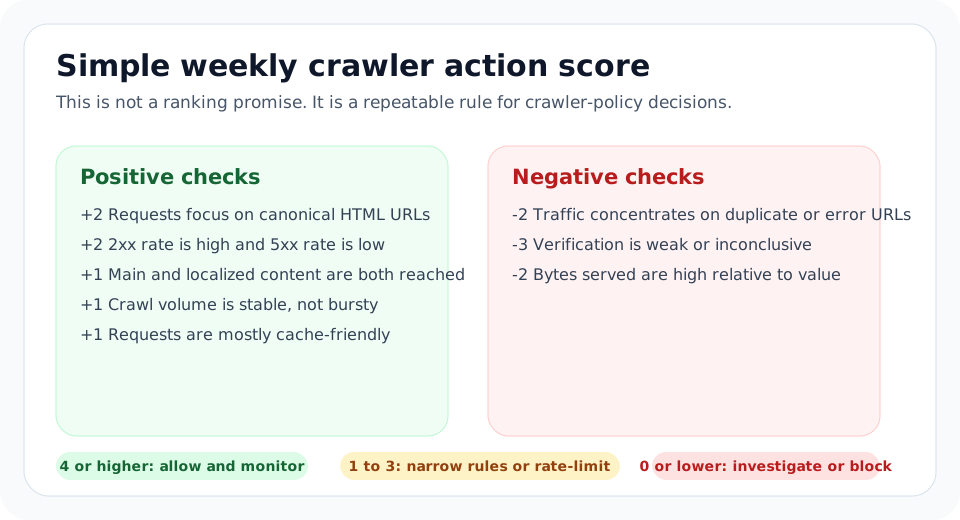
Step 6: Score Four Signals, Not Just Volume
Once crawler families are clean, score them on four operating signals:
| Signal | Healthy pattern | Risk pattern |
|---|---|---|
| URL quality | Canonical pages, docs, blog posts, product pages | Parameters, search results, admin paths, duplicate URLs |
| Response health | Mostly 200 and useful 301 | Repeated 404, 5xx, redirect loops |
| Cost | Moderate bytes on HTML | Heavy media downloads, repeated cache misses, bursty asset crawling |
| Business value | Visits to indexable pages and useful content | Mostly low-value paths with no clear visibility upside |
This makes the review operational instead of ideological.
Step 7: Turn The Findings Into A Policy
Your last step should be narrower than “allow AI” or “block AI.”
| Situation | Better action |
|---|---|
| Verified crawler, healthy URLs, manageable cost | Allow and monitor |
| Useful crawler, but noisy duplicate paths | Allow with narrower path rules |
| User-triggered access on important public pages | Keep access open and improve page quality |
| Unverified or abusive traffic | Rate-limit or block |
| High-cost crawling on assets or private paths | Restrict those paths, not the whole public site |
For a narrower decision on training access, use the GPTBot decision framework. For on-page crawl controls, compare the logs with Robots.txt Checker, Canonical Checker, Sitemap Checker, and Technical SEO Audit.
Common Failure Modes
This is where teams usually misread the data:
| Failure mode | What usually went wrong | Better check |
|---|---|---|
| ”Googlebot” traffic looks huge | Raw user-agent strings were trusted without verification | Use reverse DNS or Google IP ranges first |
| OpenAI traffic looks inconsistent | OAI-SearchBot, GPTBot, and ChatGPT-User were merged into one bucket | Separate search, training, and user-triggered fetches |
| Cloudflare shows violations after a new rule | The dashboard compares current directives with past requests | Recheck the rule date before calling it non-compliance |
| Search Console totals do not match logs | Crawl Stats is Google-only and may differ from server logs | Treat it as Google context, not a full crawler ledger |
| Byte cost looks scary | Static assets or cache-miss paths were mixed into the review | Split HTML, media, parameters, and locale paths |
A Weekly Review Checklist
Use this checklist for recurring reviews:
- Export the last 7 days of crawler traffic.
- Separate verified bots from unverified user agents.
- Split search, training, and user-triggered traffic.
- Rank requested paths by volume and bytes.
- Check
2xx,3xx,4xx, and5xxrates by crawler family. - Compare top requests with canonical and sitemap coverage.
- Recheck policy changes against logs one week later.
That is usually enough to catch the expensive mistakes: fake bot traffic, duplicate URL waste, broken locale paths, and crawler rules that hide the wrong content.
Next Action With Fennec
If you want a fast first pass, do this in order:
- Use Bot Simulator on the top five HTML URLs from your log export.
- Validate crawler rules in Robots.txt Checker.
- Confirm duplicate control with Canonical Checker.
- Check sitemap coverage in Sitemap Checker.
- Use Audit or GSC Management to connect crawl behavior with broader indexing patterns.