Should You Block GPTBot? A Decision Framework

Blocking GPTBot is not a moral stance. It is an operating decision.
The mistake is treating every AI crawler as the same thing. OpenAI documents different bot and agent user agents, and they do not all represent the same use case. A crawler used for model improvement, a search-discovery crawler, and a user-triggered fetch are different policy questions.
This framework helps SEO, legal, product, and infrastructure teams decide whether to allow, narrow, rate-limit, or block GPTBot without breaking useful discovery work elsewhere.
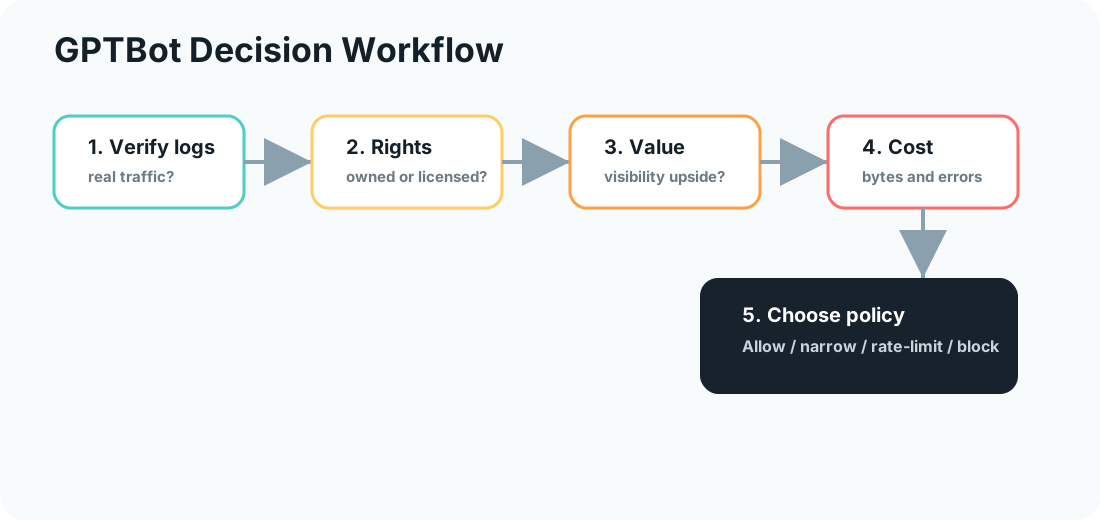
Use it after the server log analysis for AI crawlers workflow, not before. Logs tell you what is actually happening. Policy decides what should happen next.
Start With The Real Question
The question is not:
“Are AI crawlers good or bad?”
The better question is:
“For this site, this content type, and this business model, what access should GPTBot have?”
That framing keeps the decision narrow enough to be useful.
Your answer may differ by section:
| Content area | Likely policy question |
|---|---|
| Public educational blog | Is broad access acceptable for brand visibility and future AI understanding? |
| Product docs | Do we want accurate product information available to AI systems? |
| Pricing and commercial pages | Is the page public, indexable, and safe to summarize? |
| User-generated content | Do rights, moderation, or privacy concerns require restrictions? |
| Paid research or licensed data | Does access conflict with licensing or business value? |
| Search result pages and parameters | Should these be blocked for crawl hygiene regardless of crawler type? |
One sitewide answer is easy. A section-level policy is usually better.
Separate GPTBot From Other OpenAI User Agents
Before writing rules, separate crawler functions.
OpenAI’s bot documentation distinguishes user agents such as GPTBot, OAI-SearchBot, and ChatGPT-User. Check the official documentation when setting policy because naming, purpose, and guidance can change.
OpenAI currently says the GPTBot and OAI-SearchBot controls are independent: a publisher can disallow training use through GPTBot while still allowing OAI-SearchBot for ChatGPT search. ChatGPT-User is user-triggered rather than an automatic web crawler, so robots.txt rules may not apply to those requests.
As a working model:
| User agent family | Policy lens |
|---|---|
GPTBot | Content-use and model-improvement policy |
OAI-SearchBot | Search/discovery visibility policy |
ChatGPT-User | User-triggered fetch and product experience policy |
Do not block every OpenAI-related agent just because you made a GPTBot decision.
For AI search visibility, crawler access is only one part of the system. Pair crawler rules with GSC Management, Bot Simulator, Robots.txt Checker, and the AI Search Visibility Scorecard.
The Five Decision Inputs
Score each section of the site on five inputs before changing robots.txt.
| Input | Allow signal | Restrict signal |
|---|---|---|
| Content rights | You own the content and want broad machine understanding | Licensed, syndicated, paid, or rights-sensitive content |
| Business value | Visibility and accurate summaries help demand | Content is monetized primarily by exclusive access |
| Crawl cost | Requests are low, cache-friendly, and hit canonical pages | High bytes, spikes, duplicate paths, or repeated errors |
| Brand risk | Content is current, factual, and attribution-ready | Outdated, sensitive, or easily misrepresented content |
| Measurement | You can monitor logs and downstream behavior | No visibility into bot activity or impact |
If you cannot measure crawl behavior, start with logs before changing policy.
Decision Table
Use this table to choose a first policy:
| Situation | Recommended action |
|---|---|
| Public, source-worthy content with low crawl cost | Allow GPTBot and monitor |
| Useful content, but noisy parameters or thin paths | Allow GPTBot on canonical sections, block low-value paths |
| High crawl cost on assets, internal search, or duplicate URLs | Block those paths or rate-limit at the edge |
| Licensed, paid, private, or rights-sensitive content | Block GPTBot for those sections |
| No log visibility and no clear business upside | Start conservative, then revisit after logging improves |
The best policy is not always Disallow: /. It is often a narrower rule.
Example Robots.txt Rules
Allow GPTBot on public content but block internal search and private paths:
User-agent: GPTBot
Disallow: /search/
Disallow: /account/
Disallow: /admin/
Block GPTBot sitewide:
User-agent: GPTBot
Disallow: /
Keep search-oriented and user-triggered agents separate:
User-agent: GPTBot
Disallow: /

User-agent: OAI-SearchBot
Allow: /

User-agent: ChatGPT-User
Allow: /
Only use rules like that if they match your actual policy. Do not copy them blindly.
After editing, validate syntax with Robots.txt Checker and watch server logs for one week.
When Allowing GPTBot Makes Sense
Allowing can be reasonable when:
- The content is public and owned by you
- The page explains your product, brand, or topic accurately
- You want AI systems to learn the correct version of your entity
- Crawl cost is low
- You can monitor access
- The page is already indexable and useful to search users
This is common for documentation, glossary entries, product explainers, and educational blog posts.
If you allow access, make the pages worth reading. GPTBot access does not rescue thin content. Run Technical SEO, verify canonical URLs with Canonical Checker, and make the source value clear.
When Blocking GPTBot Makes Sense
Blocking can be reasonable when:
- Content is licensed, syndicated, or contractually restricted
- A paywall or subscription model depends on limited access
- User-generated content creates rights or moderation risk
- The content is outdated and likely to misrepresent the brand
- Crawling creates measurable infrastructure cost
- Legal or compliance review requires restriction
This is not anti-SEO. It is content governance.
If you block, document why. Future teams should know whether the rule was based on rights, cost, brand risk, or uncertainty.
A Better Middle Path: Narrow Access
Many sites do not need a binary answer.
Start with these path-level controls:
| Path type | Typical rule |
|---|---|
| Canonical blog and docs | Allow if public and useful |
| Internal search | Block |
| Account, checkout, admin | Block |
| Parameter-heavy listings | Block or canonicalize |
| PDFs and large media | Consider crawl cost and licensing |
| Deprecated content | Block or redirect after cleanup |
This is usually more mature than a blanket policy.
Review After Deployment
One week after changing rules, review:
- Did verified GPTBot traffic change?
- Did
4xxor5xxrates improve? - Did crawl bytes drop on low-value paths?
- Did important public pages remain accessible to intended crawlers?
- Did any internal team report broken AI search or assistant behavior?
Use the same log fields from the server log workflow so the before-and-after comparison is clean.
Fennec Workflow
For a practical first pass:
- Run Robots.txt Checker on the current policy
- Test important pages in Bot Simulator
- Review canonical and sitemap coverage with Canonical Checker and Sitemap Checker
- Score pages with the AI Search Visibility Scorecard
- Recheck logs after any policy change
The goal is not to take a side in the AI crawler debate. The goal is to make a policy that matches your content rights, business model, crawl cost, and search strategy.
Sources
- OpenAI: Crawlers documentation
- Google Search Central: robots.txt introduction
- Google Search Central: AI optimization guide
- Cloudflare: AI Crawl Control
Q&A
Is blocking GPTBot an SEO ranking factor?
No. Treat GPTBot policy as a content-use, access, and infrastructure decision. Do not expect a robots.txt rule to directly improve Google rankings.
Is GPTBot the same as OAI-SearchBot or ChatGPT-User?
No. OpenAI documents different crawler and agent user agents for different purposes. Review the official bot documentation before writing broad rules.
Should every site block GPTBot?
No. Some sites should allow it, some should narrow access, and some should block it. The right answer depends on content value, licensing, crawl cost, and business risk.
Where should I test the rule?
Test robots.txt syntax, verify logs after deployment, and review affected pages with crawler and bot simulation tools.